https://camunda.com
Orchestrate MCP tool use with AI

Orchestrate MCP tool use with AI

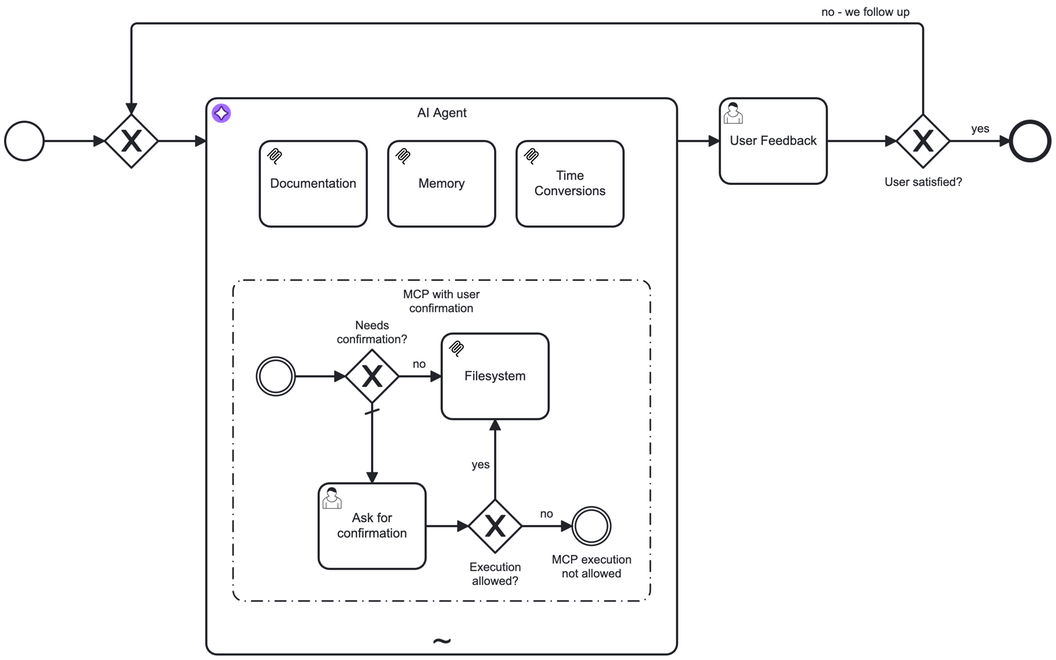
Integrate Model Context Protocol (MCP) clients with agentic orchestration so your AI agent can discover and call tools provided by MCP servers. Use standard input/output (stdio) servers started and managed as operating system processes by the connector runtime, or connect to remote servers via Streamable HTTP or HTTP SSE. Model tool discovery and tool calling in a BPMN ad-hoc sub-process to support distributed deployments, including connecting a custom connector runtime to Camunda 8 SaaS. Note that this connector is in early access.


Features and Benefits

Connect AI agents to MCP tools

Use the AI agent connector with MCP clients to access tools from locally started stdio servers or remote MCP servers over Streamable HTTP or HTTP with SSE.
Use persistent MCP client connections

Run MCP clients as part of the connector runtime so connections are managed persistently and you reduce overhead in tool discovery and tool calling.

Support SaaS with a custom runtime

Connect a custom connector runtime running the MCP Client connector to Camunda SaaS when you need MCP client capabilities in a SaaS cluster.

Filter and govern tool access

Allow specific tools or exclude risky tools to control what an AI agent can call; for example, enabling read-only file operations while blocking write actions.

Call MCP operations without an agent

Use standalone mode to list available tools or call a tool directly from a BPMN process without an AI agent.

Add human approval steps

Combine MCP tool flows with other BPMN elements such as user tasks or intermediate events to create a human-in-the-loop interaction for tool calls.

Details

  • Marketplace release date -
  • Last Github commit -
  • Associated Product Group Categories:
    • AI Services
  • Version Compatibility:
  • Used resources:

Support and documentation
Creator


Resources